> ## Documentation Index
> Fetch the complete documentation index at: https://docs.fh-development.xyz/llms.txt
> Use this file to discover all available pages before exploring further.
# Installation
The FH Development SafeGas system is the most advanced gas safety unit for any school or industrial setting because it combines safety with efficiency and realistic roleplay.
For this product to work please enable **HTTP Service** and **API Services** in your games Experience Settings. The product will not work if they are turned off. These settings are in your games **Security** section. This is the first thing a support agent will ask.
This product will not work in studio; you must go in real game and test this.

.png) ### Studio
1. Move the folder called `FH SafeGas V2` into *Workspace*,
2. Do not move anything out of it,
3. Do not delete anything
### Set-Up
1. SafeGas has 3 major gas zones (1,2,3),
2. Inside each zone there is a Bunsen, Whitelist and a Panel
### Studio
1. Move the folder called `FH SafeGas V2` into *Workspace*,
2. Do not move anything out of it,
3. Do not delete anything
### Set-Up
1. SafeGas has 3 major gas zones (1,2,3),
2. Inside each zone there is a Bunsen, Whitelist and a Panel
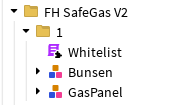 3. Opening the Whitelist and you should get something that looks like this
```lua Whitelist.lua theme={null}
local Whitelist = {}
local ranks = {1, 2,3, 4, 5} -- All allowed ranks
local groupID = 1234567890
function Whitelist.IsRanked(plr)
--return true
return table.find({ranks}, plr:GetRankInGroup(groupID))
end
return Whitelist
```
```text file name theme={null}
```
**Changing the Function:**
Do not change the function or anything else in the script because it will break. The "plr" that passes is a string - not an int. Not a object. A string so even changing the slightest thing will break the script.
4. Change the ranks table to have al of the ranks you want it to have (all ranks in your group that can use the Gas panel),
5. Then replace the group ID and your done in the settings,
6. Put the panel somewhere in your room and put a Bunsen burner on each desk!
3. Opening the Whitelist and you should get something that looks like this
```lua Whitelist.lua theme={null}
local Whitelist = {}
local ranks = {1, 2,3, 4, 5} -- All allowed ranks
local groupID = 1234567890
function Whitelist.IsRanked(plr)
--return true
return table.find({ranks}, plr:GetRankInGroup(groupID))
end
return Whitelist
```
```text file name theme={null}
```
**Changing the Function:**
Do not change the function or anything else in the script because it will break. The "plr" that passes is a string - not an int. Not a object. A string so even changing the slightest thing will break the script.
4. Change the ranks table to have al of the ranks you want it to have (all ranks in your group that can use the Gas panel),
5. Then replace the group ID and your done in the settings,
6. Put the panel somewhere in your room and put a Bunsen burner on each desk!